
Screenshots
App details
- Updated
- Mar 2, 2012
- Language
- Spanish,English
- Developer
- dvdXsoft Ltd.
- Category
- Mobile
SoftPas in:
This product is also available in the following languages:
About dvdXsoft DVD Ripper
Download dvdXsoft DVD Ripper – DVD Ripper, DVD to MP4, DVD to AVI, DVD to MP3, DVD to MKV, DVD to MOV, DVD to WMV, DVD to MPEG, DVD to DivX, DVD to Xvid, DVD to 3GP, DVD to FLV, DVD to OGG, DVD to WebM
Overview
dvdXsoft DVD Ripper is a dedicated utility designed to convert physical DVD content into digital formats for easier access and long-term preservation. Its primary purpose is to help users transition their DVD movie libraries into modern digital formats, ensuring compatibility with a wide range of devices. The app addresses the growing challenge of media obsolescence by enabling users to preserve high-quality video and audio content from DVDs, which are increasingly vulnerable to wear and damage over time.
Target users include individuals with extensive DVD collections, digital archivists, and anyone seeking to enjoy their favorite films on portable devices. The software is particularly useful for those who want to digitize movies for playback on smartphones, tablets, or media players without relying on physical discs. Real-world use cases include creating backup copies of rare or sentimental films, preparing content for travel, or extracting audio tracks for portable listening.
Developed by dvdXsoft, the application has been available since 2012, indicating a long-standing presence in the productivity software space. While specific details about the company’s background were not provided, the app’s consistent focus on DVD conversion suggests a specialized niche audience. In the broader app ecosystem, dvdXsoft DVD Ripper fills a critical gap for users who need reliable, format-agnostic tools to manage legacy media.
Key Features & Functionality
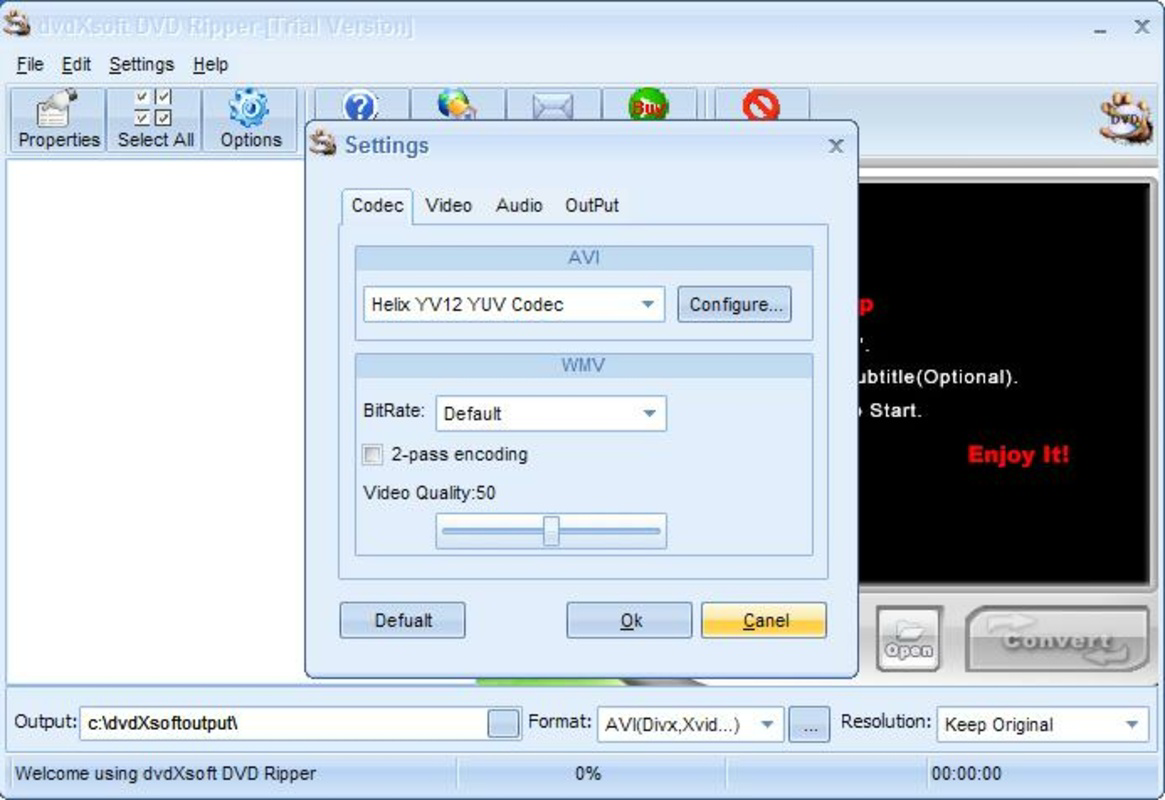
- Multiple Format Support: The software supports conversion to a wide range of video and audio formats, including MPEG-1, MPEG-2, MPEG-4, WMV, AVI, XVid, DivX, MP3, MKV, MOV, 3GP, FLV, OGG, and WebM. This versatility ensures compatibility with various devices and platforms, from older media players to modern smartphones.
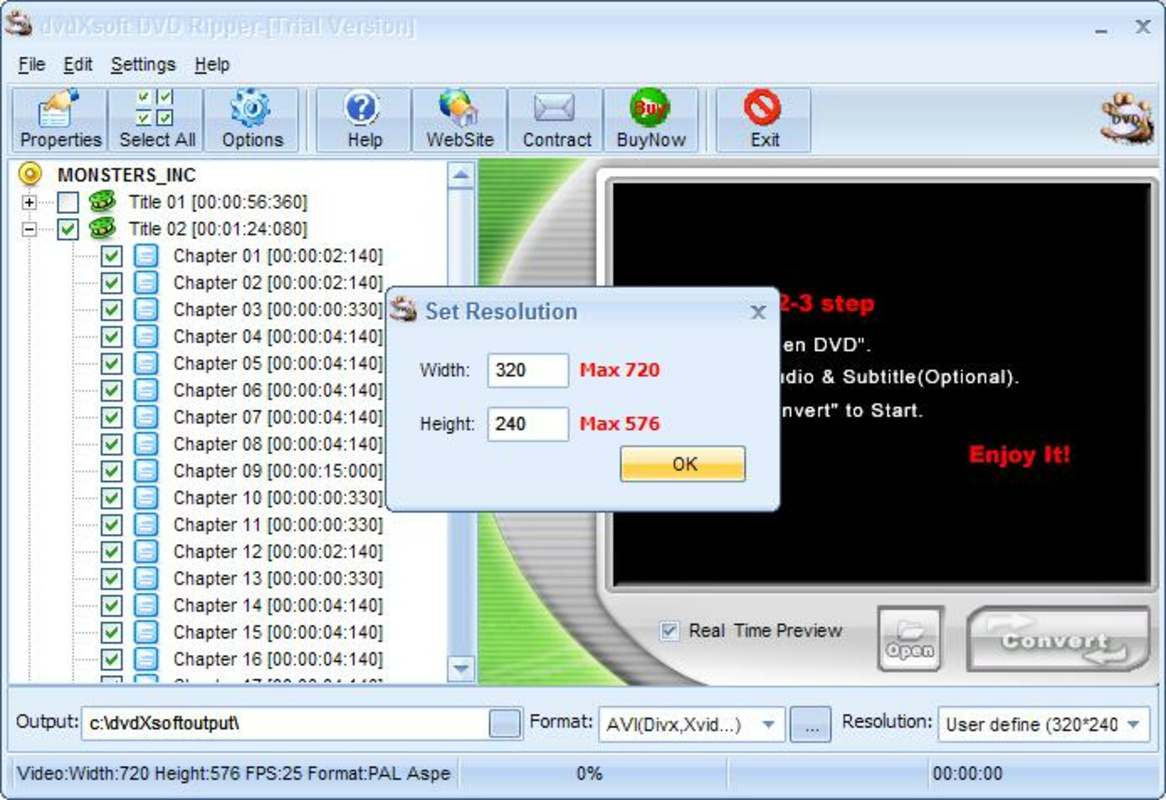
- Custom Content Selection: Users can choose to rip entire DVDs or select specific chapters, allowing for precise control over file size and content. This feature is ideal for creating personalized movie compilations or extracting only desired scenes.
- Resolution Adjustment: The app enables users to modify the output video resolution. It can automatically remove black bars to optimize screen usage on mobile devices, improving viewing clarity and fit on smaller screens.
- Image Properties Control: Advanced users can manually adjust brightness, contrast, and other visual parameters to enhance the final output quality before saving.
- Audio Extraction to MP3: The software allows users to extract audio tracks from DVDs and save them as MP3 files, making it easy to enjoy movie soundtracks or dialogues on audio-only devices.
These features collectively support practical workflows such as backing up a family’s DVD collection, preparing content for travel, or creating audio-only versions of favorite films for commuting. The ability to tailor output settings ensures that users can balance quality, file size, and device compatibility effectively.
Interface, UX & Performance
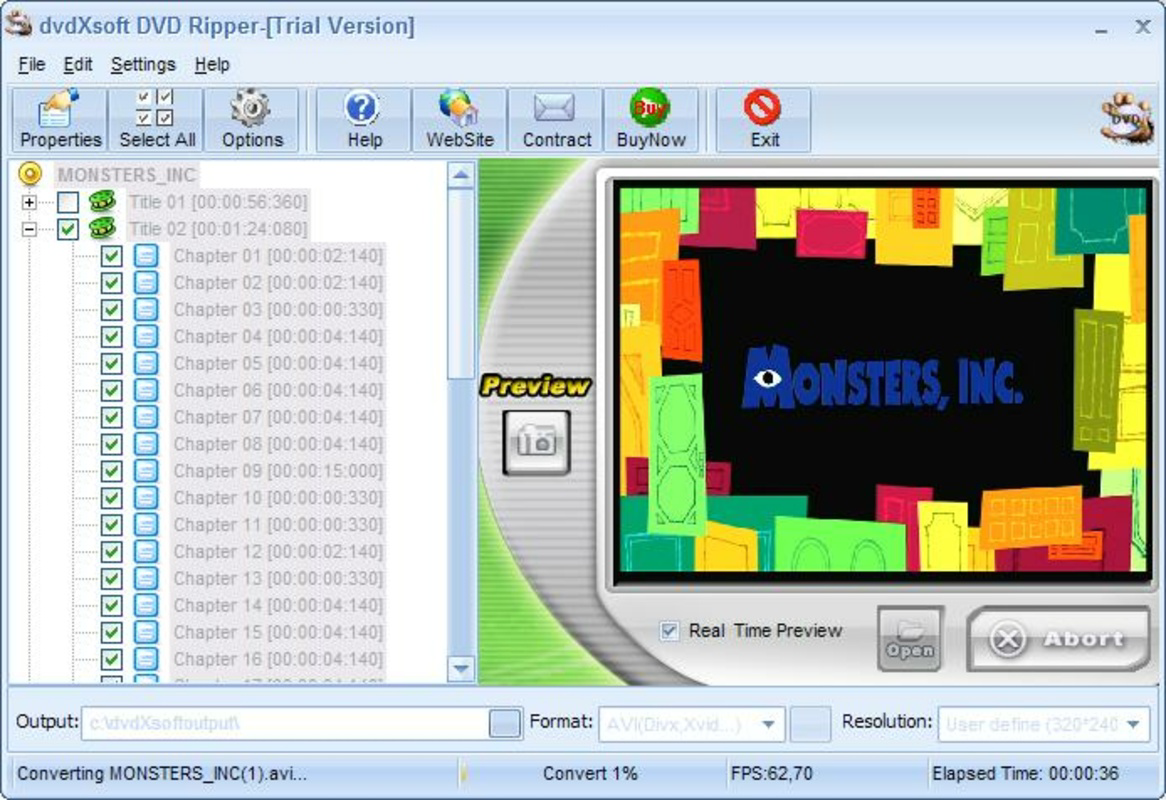
The user interface of dvdXsoft DVD Ripper is designed with simplicity in mind, aiming to provide an intuitive experience even for non-technical users. The layout allows for straightforward navigation through DVD content, with clear visual indicators for chapters and file selection. Users can easily toggle between full DVD copying and selective chapter extraction using checkbox controls.
Navigation is streamlined, with logical placement of conversion settings such as format selection, resolution, and audio options. The software appears to prioritize usability over advanced customization, making it accessible to a broad audience. While the developer did not list formal performance metrics, the application’s lightweight footprint of 3.8 MB suggests efficient resource usage, which may contribute to stable operation on older systems.
Although the developer did not specify minimum OS requirements, the app is designed for Windows platforms. Responsiveness and stability are expected to be consistent given the software’s long-standing release history. Users should experience minimal lag during the ripping process, especially when working with standard-definition content.
Platform Compatibility & Technical Requirements
dvdXsoft DVD Ripper is available for the Windows operating system. The current version is 1.0.0, with a file size of 3.8 MB. The application is designed to run on Windows-based desktops and laptops, though specific compatibility details such as minimum OS version or hardware requirements were not disclosed by the developer.
Given its release date in 2012 and relatively small file size, the software is likely optimized for older Windows versions, including Windows XP, Vista, and 7. However, users should verify compatibility with their current system before installation. The lack of information about modern Windows 10 or 11 support means that performance on newer systems may vary.
For users seeking to install this tool today, it is important to note that no official updates or modernization efforts have been mentioned. The app remains in its original form, which may affect its integration with current hardware and security standards.
Pros and Cons
Pros
- Supports a wide range of output formats, enhancing device compatibility.
- Intuitive interface enables easy navigation and content selection.
- Offers resolution adjustment and image enhancement options for better viewing quality.
- Allows selective chapter ripping, saving storage space and time.
- Includes audio extraction to MP3, useful for portable listening.
Cons
- Not updated since 2012; may lack support for modern Windows versions.
- Developer did not provide information on system requirements or compatibility.
- No indication of support for newer media formats or hardware acceleration.
- File size is small, but may indicate limited features compared to modern tools.
- No visible update mechanism or cloud integration.
FAQ
Is dvdXsoft DVD Ripper safe to download and install?
Yes, the software is designed for Windows systems and has been available since 2012. However, users should ensure they download from official sources to avoid potential risks associated with third-party sites.
Can I use this app to rip DVDs for personal use?
Yes, the app is intended for personal media conversion, allowing users to create digital backups of their DVD collections for private use.
Does dvdXsoft DVD Ripper support newer DVD formats?
The developer did not specify support for newer DVD variants. The software is designed for standard DVD-Video discs, but compatibility with encrypted or region-protected discs may vary.
Is the app compatible with Windows 10 or Windows 11?
Compatibility with Windows 10 or 11 was not confirmed by the developer. While it may run on these systems, performance and stability are not guaranteed.
How do I update dvdXsoft DVD Ripper?
No official update mechanism or release schedule was provided. Users are advised to check the developer’s website for any available updates or patches.
Final Thoughts
dvdXsoft DVD Ripper remains a functional tool for users who need to convert DVD content into modern digital formats. Its support for multiple video and audio outputs, combined with a straightforward interface, makes it a viable option for archiving and personal media management. While the software has not been updated in over a decade, its core functionality continues to serve users with legacy DVD collections.
Those who prioritize compatibility with older systems, need basic ripping capabilities, or are looking for a lightweight utility will find value in this app. However, users seeking advanced features, modern OS support, or enhanced performance should consider more current alternatives.
For individuals with a collection of DVDs and a need to preserve them digitally, dvdXsoft DVD Ripper offers a practical, no-frills solution. Download dvdXsoft DVD Ripper now.
Guides & Tutorials
How to install dvdXsoft DVD Ripper
- Click the Download button above.
- Once redirected, accept the terms and click Install.
- Wait for the dvdXsoft DVD Ripper download to finish on your device.
How to use dvdXsoft DVD Ripper
This software is primarily used for its core features described above. Open the app after installation to explore its capabilities.
User Reviews
No reviews yet. Be the first to share your experience.
You may also like
more
Que no te pillen¡
About !Que no te pillen¡Reviewed by Jason A. BilbreyShow MoreShow Less

3D Combat Zone
About 3D Combat ZoneOriginally released in 1983, 3D Combat Zone immerses players...

666: El día del portal
About 666: El día del portalOn June 6, 2006, Agent P. Stone uncovers a sinister...

80 in 1 Best Flash games
About 80 in 1 Best Flash games 80 in 1 Best Flash games is a collection of 80 fl...

ABYSS SEEKERーーWhat Do You See Deep in The Abyss
About ABYSS SEEKERーーWhat Do You See Deep in The AbyssIn ABYSS SEEKER, players...

ACA NEOGEO THE KING OF FIGHTERS 2002 for Windows
About ACA NEOGEO THE KING OF FIGHTERS 2002 for WindowsTHE KING OF FIGHTERS 2002,...